

Key Takeaway: If Google Search Console reports 404 errors for pages “discovered via sitemap.xml” that are no longer in your sitemap, it is not a technical bug or a sitemap error. Google simply retains the original discovery source in its records indefinitely. There is no permanent “fix” to stop these crawls, but they do not harm your site’s ranking or performance. You can safely ignore them or use a 301 redirect to recapture any residual traffic.
The Case of the Ghost Sitemaps
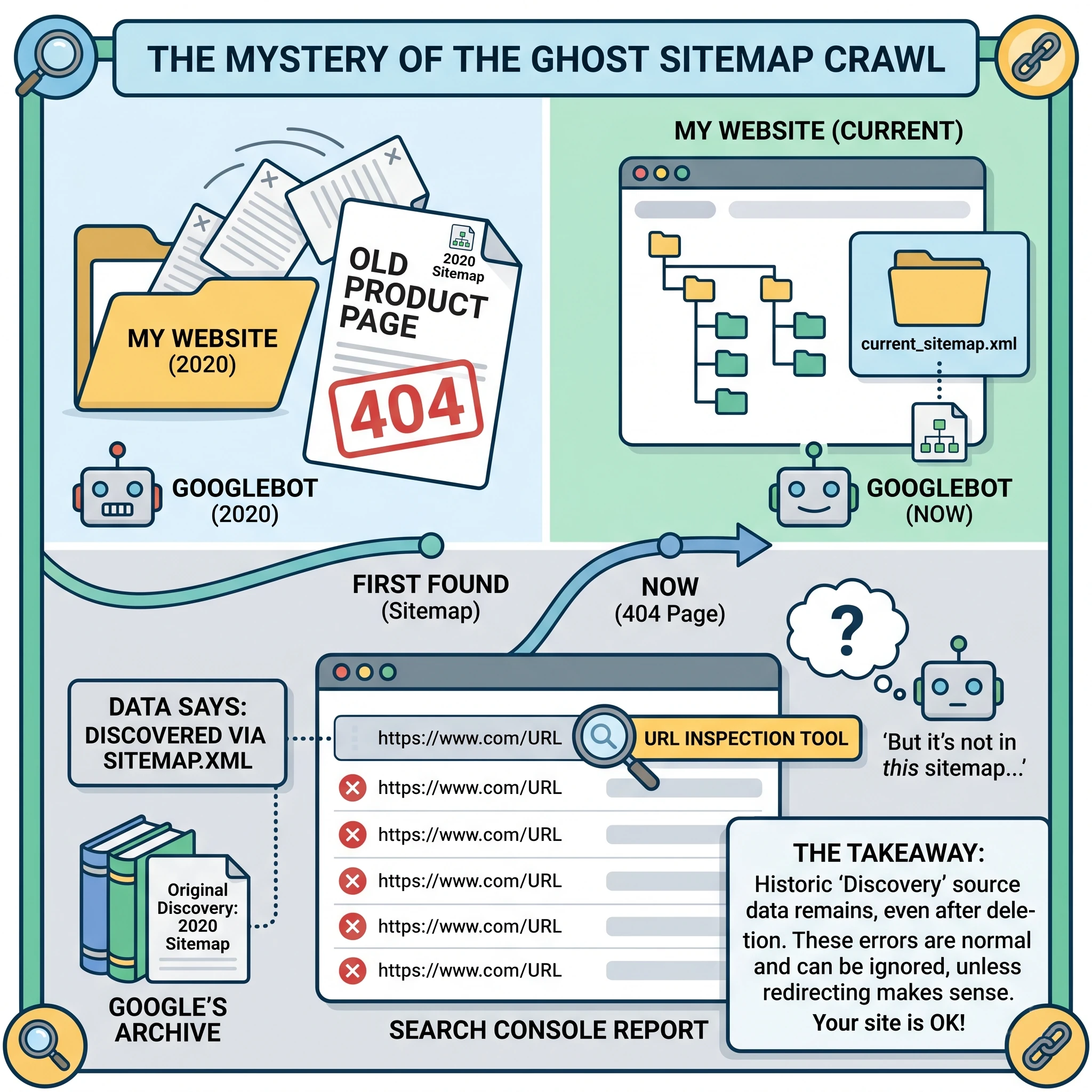
Recently, we worked with a client who was meticulously reviewing their Google Search Console (GSC) Page Indexing reports. They were understandably concerned to find hundreds of old, non-existent pages being flagged as “Not indexed” due to 404 errors.
The confusion stemmed from the “Discovery” section of the URL Inspection tool. For these dead pages, GSC claimed they were “discovered via sitemap.xml.” However, when the client checked their live sitemap, those URLs were nowhere to be found. The client had already cleaned their sitemap months ago, yet Google continued to associate these broken links with a sitemap that no longer housed them.
Why Is This Happening?
It is a common misconception that the “discovered via” field in GSC reflects your current sitemap status. In reality, this field identifies the initial way Googlebot first found that specific URL.
If a page was part of your sitemap three years ago, Google will likely always list “sitemap.xml” as the discovery source, even if you deleted the page and removed it from the XML file since then. It has nothing to do with the current version of your sitemap. Google maintains a long-term memory of where it first encountered a path. Even if you switch to a 410 “Gone” status code, Googlebot may still attempt to recrawl that URL periodically to see if the content has returned.
What Does a 404 Error Actually Mean?
When Googlebot encounters a 404-status code, it interprets this as “the page is broken or missing, but it might come back.” Because the internet is volatile, Google is designed to be persistent. It does not want to permanently drop a URL from its index if the server was just having a temporary hiccup.
Consequently, Google will continue to check back on these 404 pages for a very long time. This is not a “waste of crawl budget” for many websites. Googlebot manages its resources efficiently, and crawling a handful of dead URLs that it already knows are broken does not prevent it from indexing your new, high-quality content.
How to Fix Old 404 Pages in GSC
The reality of modern SEO is that you do not necessarily need to “fix” these errors. If the pages are truly gone and you do not have equivalent content to replace them, leaving them as a 404 is a perfectly acceptable technical state. According to Google Search Relations team members like John Mueller, these errors do not cause problems for the rest of your site.
However, if you want to be proactive or if these old URLs still have backlinks pointing to them, you have a few options for resolution.
1. The “Do Nothing” Approach (Preferred for Most)
You can simply ignore the reports in GSC. As long as the URLs are not in your current sitemap and they are not linked from your own internal pages, they will not hurt your SEO. Over time, the frequency of these crawls will decrease, though they may never truly hit zero.
2. The 301 Permanent Redirect
If the old 404 page has a direct, relevant equivalent on your current site, a 301 redirect is the best solution.
- Why use it: It passes any “link juice” or authority from the old URL to the new one.
- Preferred Solution: Use this when a product has been replaced by a newer version or a blog post has been consolidated into a larger guide.
3. The 302 Temporary Redirect
A 302 redirect tells search engines that the move is only temporary.
- Why use it: Use this only if you plan on bringing the original page back in the near future.
- Why it is generally avoided for 404s: It does not pass long term authority as effectively as a 301, and if left in place too long, Google may eventually treat it as a 301 anyway.
4. The 410 “Gone” Status Code
While a 404 says “Not Found,” a 410 says “Gone Forever.”
- Why use it: It is technically more accurate for deleted content.
- The Reality: In practice, Google treats 404s and 410s almost identically. Switching from a 404 to a 410 will not stop Google from recrawling the URL to check its status.
Recommended Strategy for Clean Reports
If you are determined to “clean up” your Search Console reports, follow these steps:
- Verify Internal Links: Use a crawling tool to ensure you are not internally linking to these 404 pages.
- Check External Backlinks: If a dead page has high quality external links, 301 redirect it to the most relevant live page.
- Use the Removals Tool Sparingly: Only use the GSC Removals tool if the page contains sensitive information or needs to be hidden urgently. It does not stop Google from crawling; it only hides the URL from search results for about six months.
Conclusion
Seeing “discovered via sitemap.xml” for a page that is not in your sitemap can be frustrating, but it is a normal part of how Google catalogues the web. It is a legacy label, not a live status report.
As long as your current sitemap is clean and your site provides a high quality user experience, these “ghost” 404s are nothing more than background noise. You can choose to redirect them to capture lost traffic, but if you choose to do nothing, your site’s health will remain intact.
External Resources for Further Reading
For more information on how Google handles crawling and sitemaps, you may find these official resources helpful:

Rob is an SEO strategist and digital marketer who has been active in the search engine optimization industry since 2001. With over two decades of experience, he has witnessed the evolution of search from the early days of keyword stuffing to the modern era of AI-driven intent.
His expertise lies in technical SEO, content strategy, and authority building. He specializes in helping websites navigate complex algorithm shifts by focusing on high-quality, human-centric content and robust E-E-A-T principles. Throughout his career, he has successfully managed digital growth for a diverse range of industries – providing a grounded and historical perspective that few in the field possess.
When he is not analyzing search trends or optimizing site architecture, he is often traveling and exploring the outdoors.
Let’s Work Together
TELL US MORE ABOUT YOUR PROJECT
Let us help you get your website found. Or, if you simply have a few questions, then fill out the form below and we will get back to you.